One session per key
Project, status colour, current tool, last prompt, turn count and how long ago it last moved. Stopped sessions fade; active ones glow green.
A Stream Deck plugin for stith
Stith Deck puts every live coding-agent session on a Stream Deck key — what it's doing, what it's blocked on — with keys to focus, message or stop it, and Claude usage gauges beside them. The one that needs you is the one that lights up.
What it does
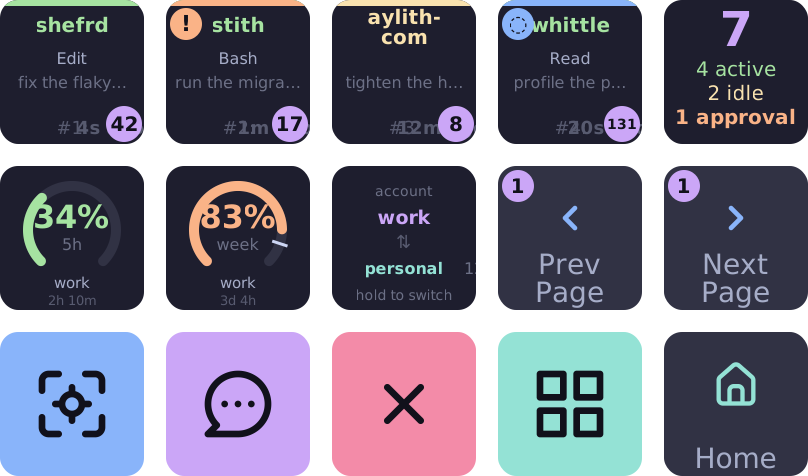
The keys above are drawn by the plugin's own renderers. Each tile is 144 pixels, so each one says one thing well.
Project, status colour, current tool, last prompt, turn count and how long ago it last moved. Stopped sessions fade; active ones glow green.
Waiting on a permission, errored, waiting for input or compacting: the one state worth shouting about takes the corner, so a wall of tiles still points at the one that needs a human.
Select a session and focus its terminal, send it a canned message, stop it, or open it in the stith dashboard — without hunting for the window.
A gauge for the Claude five-hour session or the week, coloured as it fills, with a tick where your switch threshold sits and when it resets.
The account key shows who's active and who has headroom. Hold it to rotate to the next account that does.
A gauge tells apart Stith offline, a failed usage request and No account — it never shows an empty meter as if nothing were wrong.
Nine actions
Drop any action on any key. Two bundled profiles — agents and detail — give you a fleet page and a per-session page to start from; the navigation keys move between them.
| Agent Slot | One live session per key: status, project, current tool, last prompt. |
|---|---|
| Agent Count | Fleet summary — active, idle, and approvals waiting. Tap for the agents profile. |
| Navigation | Page through the fleet, or move between profiles. |
| Agent Detail Info | One fact about the selected session: name, turns, runtime, tool, machine… |
| Agent Control | Focus, stop, or send a canned message to the selected session. |
| Prompt Display | The selected session's last prompt, spread across several keys. |
| Prompt Mode Toggle | Switch that display between wrapped and panorama. |
| Usage Gauge | A session or weekly quota meter for one account. |
| Account Switch | Hold to rotate to the next account with headroom. |
Privacy
Every key is drawn from what the stith daemon on your machine reports over loopback. No account, no telemetry, no backend of ours.
http://localhost:24200 by default, or the port in STITH_PORT. Set STITH_API_URL to point it at a proxied or remote daemon of your own.
Sessions and usage as stith serves them. The gauge reads stith's /api/usage — it does not read provider credentials or call a provider itself.
Key settings in Stream Deck, and logs in the plugin's own directory on your machine. Nothing is uploaded.
Get it
Stith Deck is not on the Elgato Marketplace yet. Today it installs from source, which takes Node and three make targets.
git clone https://github.com/aylith-labs/stith-deck.git
cd stith-deck
make install          # npm ci
make build            # bundle the plugin
make install-plugin   # copy it into Stream Deck's plugins
Then restart Stream Deck so it picks the plugin up. The actions appear under Stith.